
oowl shield
Security monitoring for small businesses, in plain English
Automated detection runs 24 hours a day on your computers and Microsoft 365◆, and a person at oowl reviews alerts in business hours. Each month you get a short report you can act on. How we contact you about a confirmed urgent issue is still being built and tested, so we promise no response time yet.
- A report, not a dashboardAbout two pages a month, with at most three things to do.
- Urgent issues◆How we contact you is still being built and tested. No response time is promised yet.
- Stored in AustraliaOn oowl's own monitoring server in an Australian data centre.
- Works with your IT providerWe watch and advise. They make the changes.
Three plans
Watch, Shield and Shield Plus, for offices with up to 10, 20 or 50 computers. From A$490 a month ex GST. Compare the plans
Reviewed by a person
Monthly reports are approved by a person at oowl before they are released to you.
Australian business
oowl is an independent cyber security firm based in Melbourne, Victoria.
◆In development, or running only in oowl's own internal pilot, and not yet available to clients. Your written quote confirms exactly what is included and running when you sign.
Availability: oowl shield is in internal testing and is not yet monitoring any client's systems. So far it has been tested on one Mac and one Microsoft 365 account, both oowl's own. Windows and Linux agents are not yet tested by oowl, and no client has received a monthly report or an urgent-issue contact. Get your quote online; your written quote sets out what is running and when monitoring would start.
Why it matters
The problems that cost small businesses money are usually quiet ones
Many small offices have antivirus and IT support, but nobody regularly reviewing security warning signs and telling the owner, in plain words, what to do.
Three ways it usually goes wrong
Illustrative scenarios, not real clients or eventsThe fake invoice
How it usually goes
A staff member types their password into a convincing fake sign-in page. Someone quietly adds a rule that forwards invoice emails to an outside address, waits, then sends your customer an invoice with new bank details. You find out when the real payment never arrives.What oowl shield looks for
New forwarding rules to outside addresses and sign-ins from unexpected countries in Microsoft 365◆ (sign-in checks need a Microsoft licence that includes the sign-in log; oowl’s own Business Basic account does not). If we confirm a case, we will contact you (how is still being built and tested).The update that never happened
How it usually goes
One computer, often the busy front-desk PC, stops installing updates. Nothing looks wrong, so nobody checks. A known flaw stays open for weeks, and known flaws are what criminals look for.What oowl shield looks for
Known flaws in installed software, checked on computers where the monitoring agent and vulnerability check are on. It goes in your monthly report, with steps your IT provider can follow.The extra administrator
How it usually goes
After repeated password guessing, someone gets in and creates a new administrator account so they can come back later. It sits there unnoticed among the other accounts.What oowl shield looks for
Repeated failed sign-ins and new or changed administrator accounts. A person at oowl reviews them, and if we confirm one is real we will contact you (how is still being built and tested).Where oowl shield fits
Your antivirus
Blocks known bad files on each computer. Tools vary, and many don't report forwarding rules, missing updates or new admin accounts.Your IT provider
Sets things up and fixes them. Many IT arrangements don't include regular review of security warning signs, so it's worth checking yours.oowl shield
Automated detection watches for warning signs on your computers, and in Microsoft 365◆. A person at oowl reviews what it flags in business hours and tells you and your IT provider what to do.Questions you may be getting
Questions that insurers and larger customers sometimes ask include:
- Do you use multi-factor sign-in on email?
- How quickly do you install security updates?
- Is anyone monitoring your systems?
Our reports can give you written evidence for some of these answers. Insurers decide what they accept, and we do not give insurance advice.
How it works
Automated detection 24 hours a day, with a person reviewing what matters
A small agent on each computer reports to oowl's server in Australia. Rules flag unusual activity, a person at oowl reviews the flags that matter in business hours, and you hear about it in words you can act on.
From your computers to your report
Monitoring data is stored in Australia; one coded flow leaves (see security and privacy)- 1. Your computersA small agent on each Windows, Mac or Linux computer. It only sends data out, encrypted.
- 2. oowl's server, in AustraliaEvents and alerts are stored in an Australian data centre, under reference codes, not your business name.
- 3. Rules and triage◆Rules flag what matters. Names become codes, then an AI assistant helps sort the alerts.
- The one flow that leaves Australia◆The AI assistant (Anthropic, US) receives codes only, never names or addresses.
- 4. A personSomeone at oowl reviews urgent alerts and reports before we contact you.
- 5. YouA monthly report with up to three actions. Urgent-issue contact is still being built and tested.
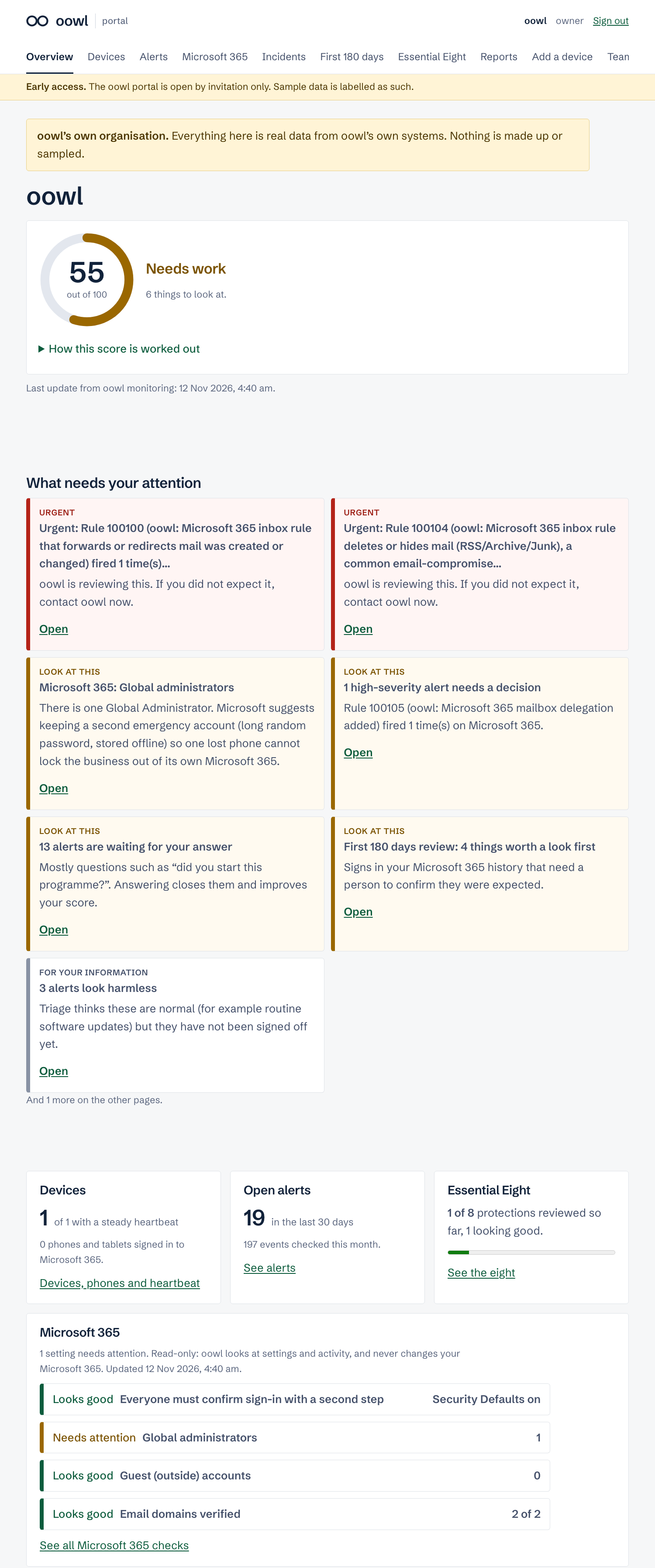
- Microsoft 365◆Read-only activity logs, on Shield and Shield Plus. We can't read email or change anything.
What we watch
Security settings
Checked against published configuration checklists, so you see when a setting slips.
Important system files
Changes to start-up items, the hosts file and similar.
Software flaws
Known flaws in installed software.
Sign-ins and admins
Failed sign-ins and new administrator accounts.
Microsoft 365◆
Overseas sign-ins, hidden forwarding rules, new admins. Shield and up.
Who it's for
Australian businesses with roughly 5 to 50 staff and no in-house security person: medical and dental practices, accountants and bookkeepers, law firms and conveyancers, real estate agencies, architects, and trades with office staff.
What you need
- Windows, Mac or Linux computers (we confirm your versions before setup).
- An IT provider or IT person to install the agent and make the fixes we suggest.
- For Shield and Shield Plus: Microsoft 365 for your email.
What you receive each month
A short report you can act on, not a wall of alerts
Each month you get a short report written in plain English and checked by a person at oowl before it is released. It has at most three action items, each with the reason it matters and numbered steps your IT provider can follow.
How the client portal protects your sign-in
Every form in the portal checks that it came from the portal itself. Each one is checked twice: the browser must show the request came from our own site, and the form must carry a secret token that is unique to your signed-in session. So if you open a malicious website while signed in, it can’t quietly submit actions in your name.
- Multi-factor sign-in is required for everyone: an authenticator app (TOTP) or a passkey.
- Three roles (owner, admin and viewer), so people only see and do what they need to.
- Each business’s data is kept separate from every other business’s.
These are sensible safeguards, not a guarantee. No online service can promise it will never be attacked.
What needs your attention
It fixes a flaw that criminals are already using.
That account can change everyone else's settings.
What we handled
Repeated password guesses against one mailbox from overseas. All were blocked and two-step sign-in was on. No action needed.
Checked and fine
Settings scorecard, by computer
Share of recommended security settings in place, sample values. Page 2 lists the step-by-step fixes for your IT provider.
When something serious is found
Action 1: install the waiting Windows update on PC_03
- Open Settings, then Windows Update, on PC_03.
- Install the waiting cumulative update and restart.
- We confirm the fix in next month's report.
Every client receives
A baseline report
About two weeks after setup: where you stand on day 14.
A monthly report
About two pages, at most three action items, reviewed by a person.
Urgent-issue contact◆
Being built and tested. No response time is promised yet.
Quarterly evidence pack◆
Shield and Shield Plus: an evidence summary set against the Essential Eight. Not an assessment or certification.
The promise, stated plainly
Automated 24/7 detection, human review in business hours. oowl shield is not a 24/7 staffed security operations centre. We tell you that up front so you can plan around it.
Sent to you each month
A PDF by email, written for the person who runs the business.
Steps for your IT provider
The technical detail sits on page 2, ready to forward.
Fixes followed up
Next month's report confirms whether each fix held.
The plans
Three plans, from prices per month, in Australian dollars
Every plan is designed to include automated detection 24 hours a day and a monthly report reviewed by a person. Contact about confirmed urgent issues is still being built and tested, so no response time is promised yet. The one-off setup fee equals one month's fee and covers installation, the two-week settle period and your baseline report.
Prices shown are starting prices. Your final price depends on how many devices you have (computers, phones, tablets and handhelds). We confirm it in your written quote, before you commit to anything.
Watch
Monitoring for the computers in a small office.
Who it's for
Offices that want someone outside the business keeping watch, and a short monthly answer to "are we OK?"
Included
- Agent on up to 10 Windows, Mac or Linux computers
- Settings, system file, software-flaw and sign-in monitoring
- Baseline report after two weeks
- Monthly report reviewed by a person
- Up to three action items a month
- Urgent-issue contact (in testing, no response time promised)
Extra computers A$29 each per month ex GST.
Shield
Everything in Watch, plus Microsoft 365 monitoring and quarterly evidence, both in development.
Who it's for
Businesses facing a cyber-insurance renewal, or that have had a near miss such as a fake invoice.
Everything in Watch, plus
- Agent on up to 20 computers
- Microsoft 365 monitoring, one tenant◆
- Quarterly Essential Eight evidence pack◆
- Written evidence for insurer questionnaires◆
- 12-month outcome review◆
Extra computers A$29 each per month ex GST.
Shield Plus
Everything in Shield, for larger offices and groups with several tenants.
Who it's for
Businesses that want a regular conversation about security, and to hear about serious issues after hours.
Everything in Shield, plus
- Agent on up to 50 computers
- Up to three Microsoft 365 tenants◆
- 30-minute call with oowl every quarter
- Best-effort SMS after hours if we see a confirmed urgent issue◆
Extra computers: ask us.
Every plan includes
Compare the plans
Three plans, one way of working.
Swipe sideways to see all three plans.
| WatchUp to 10 computers | ShieldUp to 20 computers | Shield PlusUp to 50 computers | |
|---|---|---|---|
| Price, ex GST | |||
| Monthly fee, from | A$490 | A$890 | A$1,490 |
| One-off setup fee, from | A$490 | A$890 | A$1,490 |
| Monthly fee inc GST, from | A$539 | A$979 | A$1,639 |
| Extra computers, per month | A$29 each | A$29 each | Ask us |
| Contract term | Confirmed in your written quote | ||
| Final price | Depends on your devices (computers, phones, tablets and handhelds), confirmed in your written quote | ||
| Coverage | |||
| Computers included | Up to 10 | Up to 20 | Up to 50 |
| Microsoft 365 tenants◆ | Not included | 1 | Up to 3 |
| Settings, system files, software flaws, sign-ins | |||
| Reports and evidence | |||
| Baseline report after setup | |||
| Monthly report, reviewed by a person | |||
| Quarterly Essential Eight evidence pack◆ | – | ||
| Evidence for insurer questionnaires◆ | – | ||
| 12-month outcome review◆ | – | ||
| Quarterly 30-minute call | – | – | |
| Urgent issues | |||
| Business hours | In testing, no response time promised | In testing, no response time promised | In testing, no response time promised |
| After hours | – | – | Best-effort SMS◆ |
| No-AI option (alert data not sent to the AI provider)◆ | Ask us | Ask us | On request, quoted separately |
All prices in Australian dollars. Inc-GST figures are the ex-GST price plus 10%. We make no response-time promise for urgent issues yet: how and how fast we contact you is still being built and tested. Service levels will be set out in your agreement once they have passed live tests.
Which plan fits?
Choose Watch if
you have up to 10 computers and mainly want to know they're up to date, set up safely and being watched, with a short monthly answer to "are we OK?"Choose Shield if
your business runs on Microsoft 365 email, sends or receives invoices by email, or has a cyber-insurance renewal coming up. This is the plan we recommend for offices that use Microsoft 365.Choose Shield Plus if
you have 20 to 50 computers or more than one Microsoft 365 tenant, or you want a quarterly conversation and a best-effort after-hours SMS◆ for confirmed urgent issues.Still deciding? We'll recommend one.
Tell us your size, your devices and any insurance questions on the quote form, and we put the plan in a written quote. Prefer to talk? Call 03 8400 0108 or email [email protected].
Getting set up
From first call to first report in about three weeks (our planned timeline)
Your IT provider does the installing, with oowl on the call. Nothing needs to be opened up on your network: the agent only sends data out.
Week 1
Discovery call
We check oowl shield fits and explain what it does and doesn't do.
Week 1
Agreement and staff notice
You sign the service terms. We give you a template staff notice◆.
Week 1
Install
Your IT provider installs the agent. We estimate 30 to 60 minutes.
Shield and up
Connect Microsoft 365◆
A read-only connection, plus a 10-minute questionnaire.
Weeks 1 to 3
Settle and baseline
Two weeks tuning out normal activity, then your baseline report.
Every month
Monthly report
Reviewed and ready to act on. Billing starts after the baseline.
What we'll ask you for
- Two urgent contacts, each with a mobile and email, and how you'd like to hear about issues after hours
- Your IT provider's contact, and a time for them to install the agent (we estimate 30 to 60 minutes)
- A list of the computers to monitor
- Shield and Shield Plus: your Microsoft 365 administrator to approve a read-only connection
- Confirmation that staff have been told, using our template notice
- A 10-minute questionnaire about macros, backups, approved software and admin requests
What we aim to provide
- A baseline report about two weeks after install: where you stand on day 14.
- A monthly report, checked by a person, with at most three action items.
- Contact about confirmed urgent issues (still being built and tested; no response time promised yet).
- Steps your IT provider can follow, and a check that each fix held.
- No automatic blocking on your computers unless you agree to it in writing.
Good to know
Supported computers
Windows 10 and 11, Windows Server 2016 and later, Macs (Apple silicon on Big Sur or later, Intel on Sierra or later) and current Linux.
What isn't covered
Phones, network equipment and printers are not monitored. Your report lists them as "not monitored", so nothing is assumed.
Larger offices
For ten or more Windows computers, your IT provider can roll the agent out through Intune or Group Policy instead of one by one.
If alert data must not leave Australia: the no-AI option◆
For businesses that can't allow any processing outside Australia, a person at oowl reviews your alerts without the AI assistant, so alert data is not sent to the AI provider. Reports still reach you by email. It takes more of our time, so it's quoted separately. Ask us about it on any plan.
Your data, security and privacy
Where your data goes, and what we don't collect
Stored in Australia
On oowl's own monitoring server in an Australian data centre, hosted by BinaryLane. Everything sits in one data centre; we say so rather than promise multi-site resilience.
The one flow that leaves Australia◆
To help sort alerts, oowl uses an AI assistant from Anthropic, a US company. Before anything is sent, names, email addresses, usernames and device names are swapped for codes:
Coded (pseudonymised) details are not anonymous. Anthropic may keep them for up to 30 days, or longer if flagged by its safety systems. We name this flow, and exactly which details are coded, in your agreement. The no-AI option avoids it. Reports and urgent messages reach you by email and SMS through service providers that may be outside Australia.
What we collect, and what we don't
Collected: usernames, email addresses, sign-in times and countries, IP addresses, device names, file paths, and mailbox rule settings such as forwarding addresses.
Not collected: the content of emails, files or documents. File monitoring records file fingerprints and details, not contents. You tell us which folders hold client, patient or other sensitive records, and we exclude them.
Not monitored: phones, network equipment and printers. Your report lists them as "not monitored".
How we protect it
- Two firewall layers (server and hosting provider) block inbound traffic except monitoring agents and oowl's administrator address.
- Agents enrol with a password and connect over encrypted links.
- Clients never log in to the monitoring console; you receive reports instead.
- Device and group names on the server use reference codes, not your business name.
- Raw alert data in the monitoring system is deleted automatically after 90 days. Reports and review notes are kept for the period set out in your agreement.
- No automatic blocking on your computers unless agreed separately in writing.
Your staff
Monitoring covers your staff's work accounts and computers, so they should be told first. We are preparing a template staff notice◆. Employers may need to notify staff before monitoring starts, and some states (including NSW and the ACT) set specific written-notice rules. Take advice on what applies to you.
Essential Eight evidence◆
The Essential Eight is the Australian Signals Directorate's baseline set of mitigation strategies. The quarterly evidence pack◆ is in development. It is planned to show, control by control, what monitoring can see.
| Area | Where the evidence comes from |
|---|---|
| Patch applications | Monitoring: known flaws in installed software |
| Patch operating systems | Monitoring: known flaws in installed software |
| Multi-factor authentication | Microsoft 365 sign-in records◆ |
| Restrict admin privileges | Monitoring: new or changed admin accounts |
| Macros, application hardening, application control, backups | Your short questionnaire, plus some setting checks |
It is evidence, not certification. The pack is labelled "indicative, not an assessment". A formal Essential Eight assessment is a separate piece of work.
What oowl shield is not
Common questions
The questions owners and practice managers ask us
What happens when something is found?
Rules flag it and a person at oowl checks it. If we confirm it as urgent, we will contact your nominated person and help your IT provider act. How we reach you, and how fast, is still being built and tested, so we promise no response time yet. Anything less pressing goes into your monthly report, with steps your IT provider can follow. We check the fix in the next report.
Will it slow our computers down?
The agent is designed to be light on memory and processing, and most people should not notice it. We will measure it on your computers during the settle weeks. It only sends data out, so nothing needs to be opened up on your network.
Where is our data kept?
On oowl's monitoring server in an Australian data centre. One coded flow leaves Australia: alert details, with names, email addresses, usernames and device names replaced by codes, are sent to an AI provider (Anthropic, US) to help sort them, and may be kept there for up to 30 days. That part is running in oowl's own internal pilot, and the no-AI option avoids it. Reports are designed to reach you by email. How urgent messages reach you is still being built and tested.
Can you read our emails or files?
oowl shield is set up not to collect the content of emails, files or documents. The Microsoft 365 connection (running in oowl's own internal pilot) is read-only and reads activity records such as sign-ins and mailbox rules, not messages.
Do we need to change IT provider?
No. oowl shield works alongside your existing IT provider or IT person. We watch and advise; they make the changes.
Do we still need antivirus?
Yes. oowl shield isn't antivirus and doesn't block anything automatically on your computers. Keep Microsoft Defender for Business or similar.
Is someone watching 24/7?
Detection is automated and runs 24 hours a day. People at oowl review alerts in business hours; we do not monitor outside business hours. Shield Plus is planned to add a best-effort SMS after hours if we see a confirmed urgent issue (in development). oowl shield is not a 24/7 staffed security operations centre.
What do we tell our staff?
Monitoring covers work accounts and computers, so staff should be told before it starts. We are preparing a template notice for you to use. Employers may need to notify staff in advance, and some states (including NSW and the ACT) set specific written-notice rules, so take advice on what applies to you.
How long does setup take?
We plan on about three weeks from the first call to your baseline report. We estimate your IT provider's install at 30 to 60 minutes, then we spend two weeks learning what's normal for your business.
Will we get false alarms?
Those two settle weeks are for tuning out normal activity. After that, a person at oowl reviews an issue before we contact you, so we only contact you about things we think need action. We can't promise there will be no false alarms.
Will this help with our cyber insurance?
It may help you answer insurer questions. On Shield and Shield Plus we plan to provide a quarterly evidence summary set against the Essential Eight, and written evidence for insurer questionnaires, both in development. Insurers decide what they accept, and we do not give insurance advice. It is not an assessment or a certification.
How does billing work?
A one-off setup fee equal to one month, then a monthly fee that starts after your baseline report. Plans start from A$490 a month for Watch, A$890 for Shield and A$1,490 for Shield Plus, in Australian dollars, ex GST. Your final price depends on how many devices you have (computers, phones, tablets and handhelds) and is confirmed in your written quote.
What if we want to stop?
We remove the agents with your IT provider and disconnect Microsoft 365. Raw monitoring data is deleted automatically within 90 days, reports are kept for the period set out in your agreement, and we confirm the deletion in writing. The notice period is set out in your agreement.
About oowl
An independent Australian cyber security firm for small and medium businesses
oowl is based in Melbourne, Victoria, and serves businesses across Australia. We look at where you stand, tell you plainly what matters, and help you keep it that way. oowl shield is the ongoing part of that work, after an assessment or on its own. Insurers often ask about monitoring and endpoint protection: see how to answer a cyber insurance questionnaire.
Plain English, always
Every report is written for the person who runs the business, with the technical steps kept on a separate page for your IT provider.Honest about scope
We say what the service is not: not a 24/7 staffed centre, not antivirus, not a certification. You can plan around the truth.Reviewed by a person
Automation does the watching. A person at oowl reviews urgent alerts and reports before we contact you.Australian by default
Your monitoring data is stored in Australia, and the one flow that leaves is named in your agreement.Next step
Get your quote
Tell us about your business online: how many computers, phones, tablets and handhelds you have, and what worries you. We check oowl shield fits, recommend a plan and send a written quote before you commit to anything. No obligation. A call is optional.
03 8400 0108 [email protected] Get your quoteHelpful to have handy for the quote
- Roughly how many computers you have, and whether they're Windows or Mac
- Whether you use Microsoft 365 for email
- Who looks after your IT, and how to reach them
- Your cyber-insurance renewal date, if you have a policy
- Anything that's worried you recently, such as a strange invoice or sign-in alert
All prices are in Australian dollars and exclude GST unless shown. oowl shield uses the open-source Wazuh platform; oowl is not affiliated with or endorsed by Wazuh Inc. oowl holds no security certifications or accreditations. Features marked ◆ are in development, or running only in oowl's own internal pilot, and not yet available to clients. Sample reports and screens on this page use made-up data.